seats TESLA MODEL S 2018 User Guide
[x] Cancel search | Manufacturer: TESLA, Model Year: 2018, Model line: MODEL S, Model: TESLA MODEL S 2018Pages: 195, PDF Size: 5.51 MB
Page 30 of 195

Always position single-strap tethers to run
over the top of the head support.
Note: To prevent the single-strap tether from
moving side to side, the top of the head support deforms.
Testing a Child Safety Seat
Before seating a child, always make sure the
child safety seat is not loose:
1. Hold the child safety seat by the belt path
and try to slide the safety seat from side
to side and front to back.
2. If the seat moves more than 2.5 cm, it is
too loose. Tighten the belt or reconnect
the ISOFIX retained child safety seat.
3. If you are unable to reduce slack, try a
different seat location or try another child
safety seat.
Child Safety Seat Warnings
Warning: Never seat a child in a child
safety seat or a booster seat on the front
passenger seat when the airbag is
activated. Doing so can cause serious injury or death.Warning: Never use a rearward facing
child restraint on a seat protected by an
active airbag. Doing so can cause serious
injury or death. Refer to the warning label
located on the sun visor.Warning: Child restraint systems are
designed to be secured in vehicle seatsby lap belts or the lap belt portion of a lap-shoulder belt. Children could be
endangered in a crash if their child restraints are not properly secured in the
vehicle.Warning: According to collision statistics,
children are safer when properly
restrained in the rear seating positions
than in the front seating positions.Warning: Do not use a forward facing
child safety seat until your child weighs
over 9 kg and can sit independently. Up
to the age of two, a child
Page 32 of 195
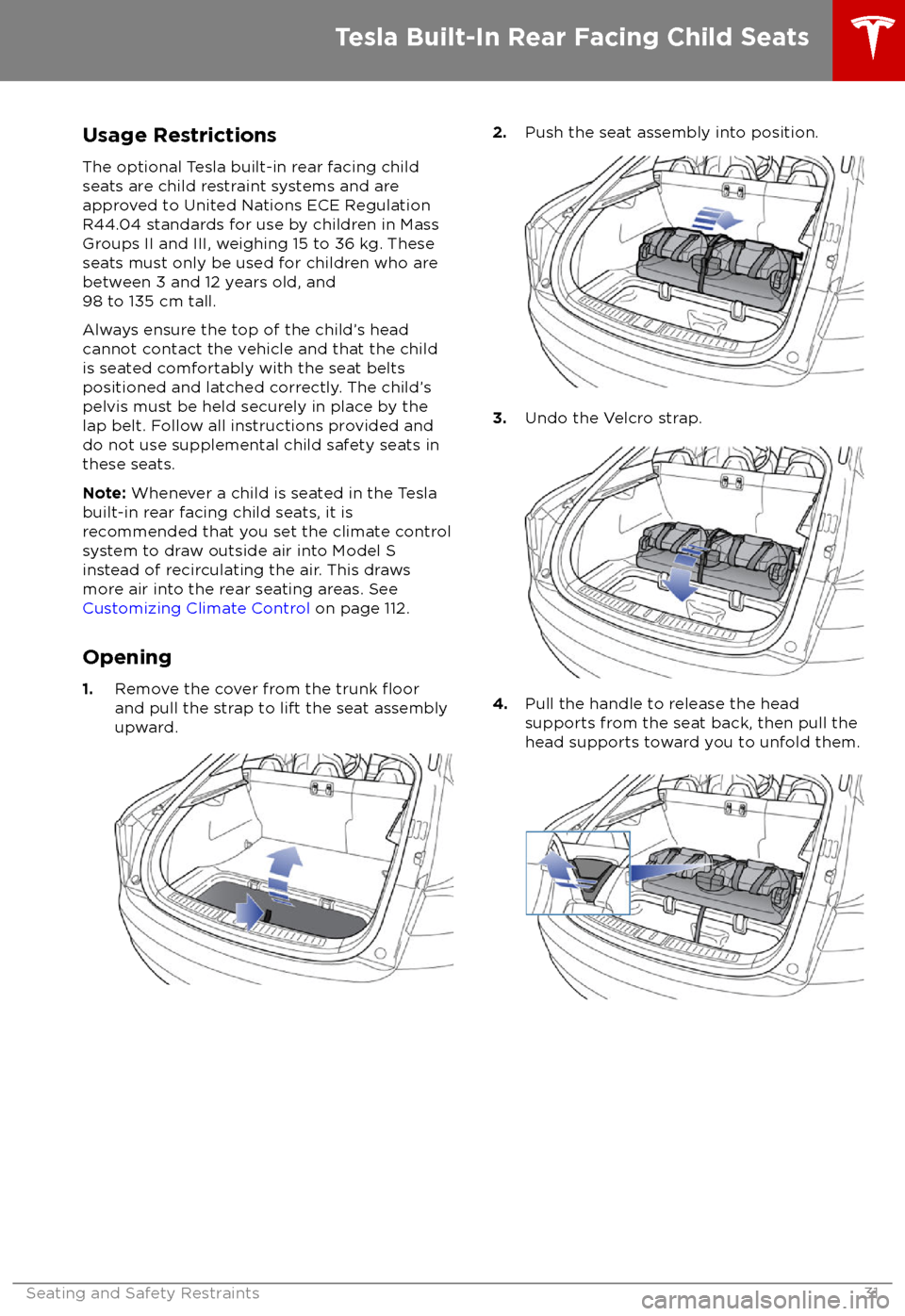
Usage RestrictionsThe optional Tesla built-in rear facing child
seats are child restraint systems and are
approved to United Nations ECE Regulation
R44.04 standards for use by children in Mass
Groups II and III, weighing 15 to 36 kg. These
seats must only be used for children who are
between 3 and 12 years old, and
98 to 135 cm tall.
Always ensure the top of the child
Page 33 of 195

5.Raise the seat back to the upright position
and push until it locks into position. Visually check to ensure that the retaining
catches are engaged.
6. Check that the seat back and seat base
are securely retained in the upright
position by trying to pull the seat back
toward you.
Folding
Caution: Before folding the seats, fasten
the seat belts to prevent them from
getting trapped in the seat mechanism
and being damaged.
1. Pull the handle to release the seat back
and pull the seat back fully forward.
2. Push the lever to release the head
supports from the seat back, then fold
back onto the seat.
3. Secure the Velcro strap.
4.Pull the strap at the rear of the seat to fold
the seat assembly into the trunk floor.
5. Replace the cover on the trunk floor.
Seating a Child
The Tesla built-in rear facing child seats are
child restraint systems and are approved to
United Nations ECE Regulation R44.04
standards for use by children in Mass Groups II
and III, weighing 15 - 36 kg. These seats must
only be used for children who are between 3
and 12 years old, and 98 - 135 cm tall.
Tesla Built-In Rear Facing Child Seats
32Model S Owner
Page 35 of 195
Warnings - Tesla Child SeatsWarning: The Tesla built-in rear facing
seats are child restraint systems and are
approved to United Nations ECE
Regulation R44.04 standards for use by
children in Mass Groups II and III,
weighing 15 to 36 kg. These seats must
only be used for children who are
between 3 and 12 years old, and
98 to 135 cm tall, provided the top of the
child
Page 38 of 195

Disabling the Passenger Front
Airbags
When a child is seated in the front passenger
seat (even when the child is seated in a child safety seat or booster seat), you must disable
the passenger front airbags to prevent them
from injuring the child if a collision occurs.
Note: Rear seats are the preferred location for
seating children in child safety seats.
To turn
off the front and side airbags on the
passenger side of the vehicle, touch
Controls > Settings > Safety & Security >
Passenger Front Airbag .
The OFF status of the front passenger airbag
displays in the upper right corner of the touchscreen. When the airbag is ON, no status
is displayed on the touchscreen.
If the airbag is on, even if you have turned itoff (or vice versa), contact Tesla immediately.
Note: Model S has a capacitive touchscreen
and may not respond to your touch if you are
wearing standard gloves. If the touchscreen is
not responding, remove gloves or wear gloves
with conductive
fingertips for use with
capacitive touchscreens.
Warning: Never seat a child in a child
safety seat or a booster seat on the front
passenger seat when the airbag is
activated. Doing so can cause serious injury or death.Warning: If the passenger airbag control
does not appear to be functioning, do not
seat a passenger in the front seat.
Contact Tesla immediately to have the
vehicle inspected and if necessary,
repaired.
Inflation Effects
Warning: When airbags inflate, a finepowder is released. This powder can
irritate the skin and should be thoroughly
flushed from the eyes and from any cuts
or abrasions.
After inflation, the airbags deflate to provide a
gradual cushioning effect for the occupants
and to ensure the driver
Page 55 of 195
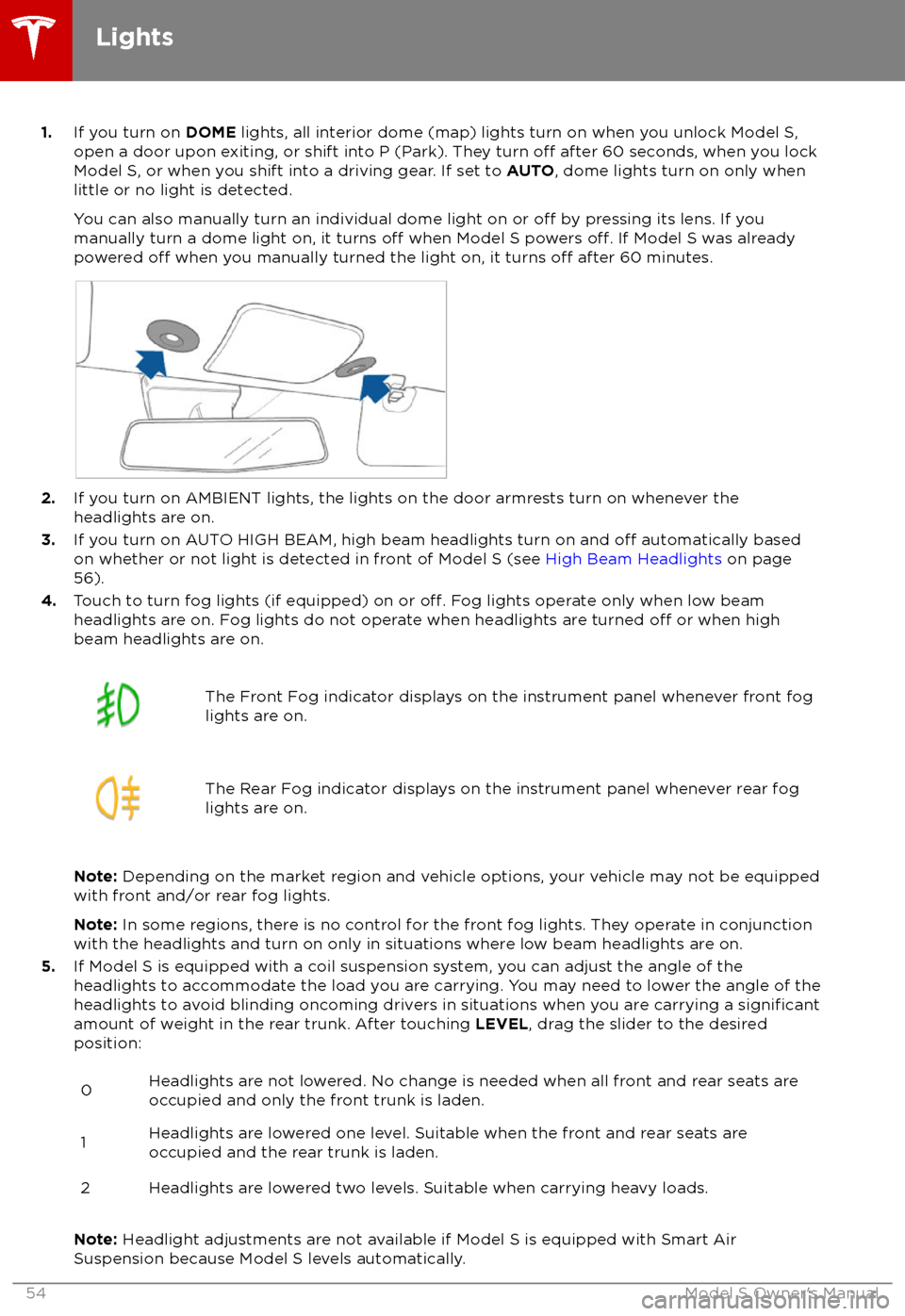
1.If you turn on DOME lights, all interior dome (map) lights turn on when you unlock Model S,
open a door upon exiting, or shift into P (Park). They turn off after 60 seconds, when you lock
Model S, or when you shift into a driving gear. If set to AUTO, dome lights turn on only when
little or no light is detected.
You can also manually turn an individual dome light on or
off by pressing its lens. If you
manually turn a dome light on, it turns off when Model S powers off. If Model S was already
powered off when you manually turned the light on, it turns off after 60 minutes.
2. If you turn on AMBIENT lights, the lights on the door armrests turn on whenever the
headlights are on.
3. If you turn on AUTO HIGH BEAM, high beam headlights turn on and
off automatically based
on whether or not light is detected in front of Model S (see High Beam Headlights on page
56).
4. Touch to turn fog lights (if equipped) on or
off. Fog lights operate only when low beam
headlights are on. Fog lights do not operate when headlights are turned off or when high
beam headlights are on.
The Front Fog indicator displays on the instrument panel whenever front fog
lights are on.The Rear Fog indicator displays on the instrument panel whenever rear fog
lights are on.
Note: Depending on the market region and vehicle options, your vehicle may not be equipped
with front and/or rear fog lights.
Note: In some regions, there is no control for the front fog lights. They operate in conjunction
with the headlights and turn on only in situations where low beam headlights are on.
5. If Model S is equipped with a coil suspension system, you can adjust the angle of the
headlights to accommodate the load you are carrying. You may need to lower the angle of theheadlights to avoid blinding oncoming drivers in situations when you are carrying a
significantamount of weight in the rear trunk. After touching LEVEL, drag the slider to the desired
position:
0Headlights are not lowered. No change is needed when all front and rear seats are
occupied and only the front trunk is laden.1Headlights are lowered one level. Suitable when the front and rear seats are occupied and the rear trunk is laden.2Headlights are lowered two levels. Suitable when carrying heavy loads.
Note: Headlight adjustments are not available if Model S is equipped with Smart Air
Suspension because Model S levels automatically.
Lights
54Model S Owner
Page 112 of 195
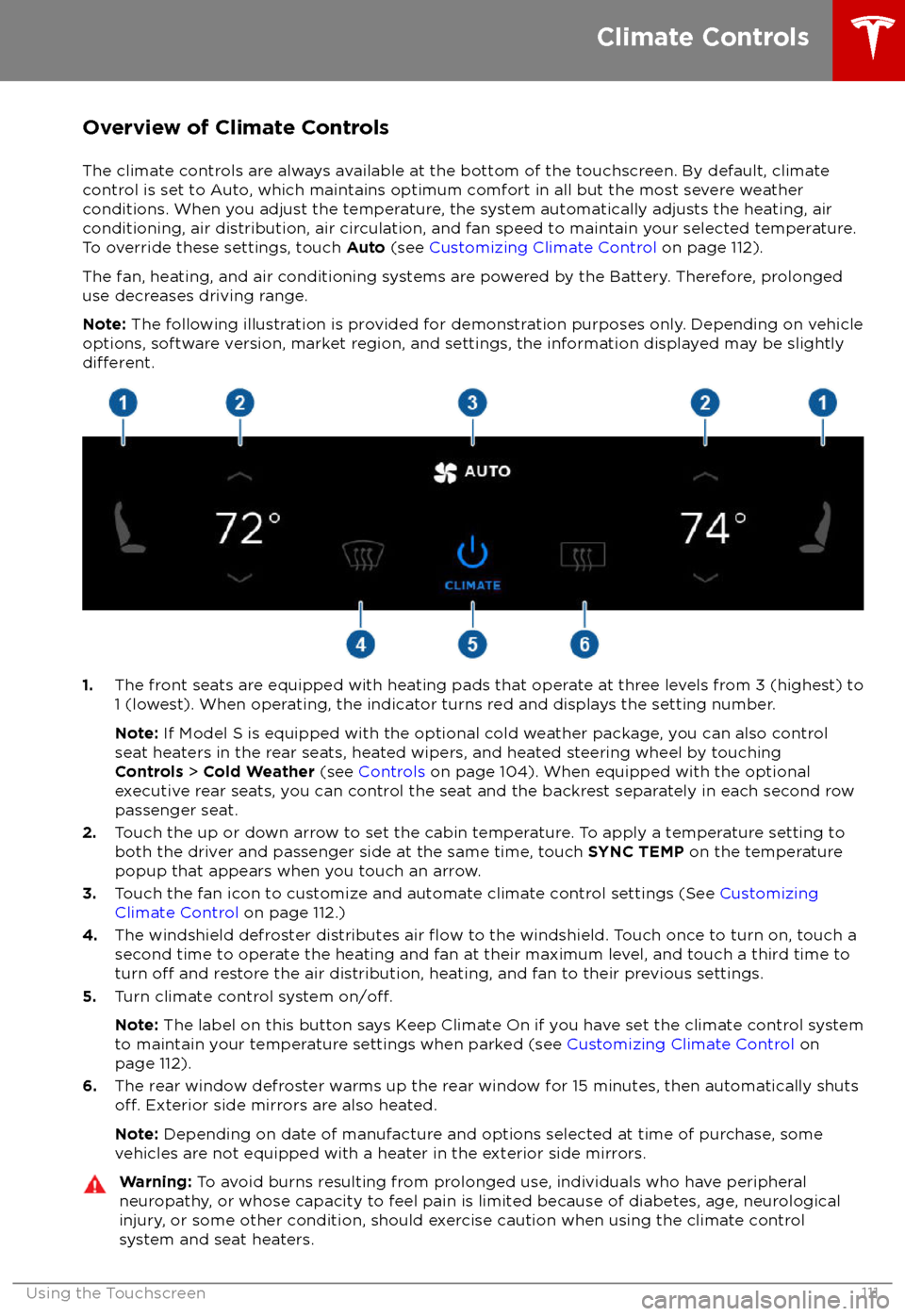
Overview of Climate Controls
The climate controls are always available at the bottom of the touchscreen. By default, climate control is set to Auto, which maintains optimum comfort in all but the most severe weather conditions. When you adjust the temperature, the system automatically adjusts the heating, air
conditioning, air distribution, air circulation, and fan speed to maintain your selected temperature. To override these settings, touch Auto (see Customizing Climate Control on page 112).
The fan, heating, and air conditioning systems are powered by the Battery. Therefore, prolonged
use decreases driving range.
Note: The following illustration is provided for demonstration purposes only. Depending on vehicle
options, software version, market region, and settings, the information displayed may be slightly
different.
1. The front seats are equipped with heating pads that operate at three levels from 3 (highest) to
1 (lowest). When operating, the indicator turns red and displays the setting number.
Note: If Model S is equipped with the optional cold weather package, you can also control
seat heaters in the rear seats, heated wipers, and heated steering wheel by touching Controls > Cold Weather (see Controls on page 104). When equipped with the optional
executive rear seats, you can control the seat and the backrest separately in each second row
passenger seat.
2. Touch the up or down arrow to set the cabin temperature. To apply a temperature setting to
both the driver and passenger side at the same time, touch SYNC TEMP on the temperature
popup that appears when you touch an arrow.
3. Touch the fan icon to customize and automate climate control settings (See Customizing
Climate Control on page 112.)
4. The windshield defroster distributes air
flow to the windshield. Touch once to turn on, touch a
second time to operate the heating and fan at their maximum level, and touch a third time to
turn
off and restore the air distribution, heating, and fan to their previous settings.
5. Turn climate control system on/off.
Note: The label on this button says Keep Climate On if you have set the climate control system
to maintain your temperature settings when parked (see Customizing Climate Control on
page 112).
6. The rear window defroster warms up the rear window for 15 minutes, then automatically shuts
off. Exterior side mirrors are also heated.
Note: Depending on date of manufacture and options selected at time of purchase, some
vehicles are not equipped with a heater in the exterior side mirrors.
Warning: To avoid burns resulting from prolonged use, individuals who have peripheral
neuropathy, or whose capacity to feel pain is limited because of diabetes, age, neurological injury, or some other condition, should exercise caution when using the climate control
system and seat heaters.
Climate Controls
Using the Touchscreen111
Page 114 of 195
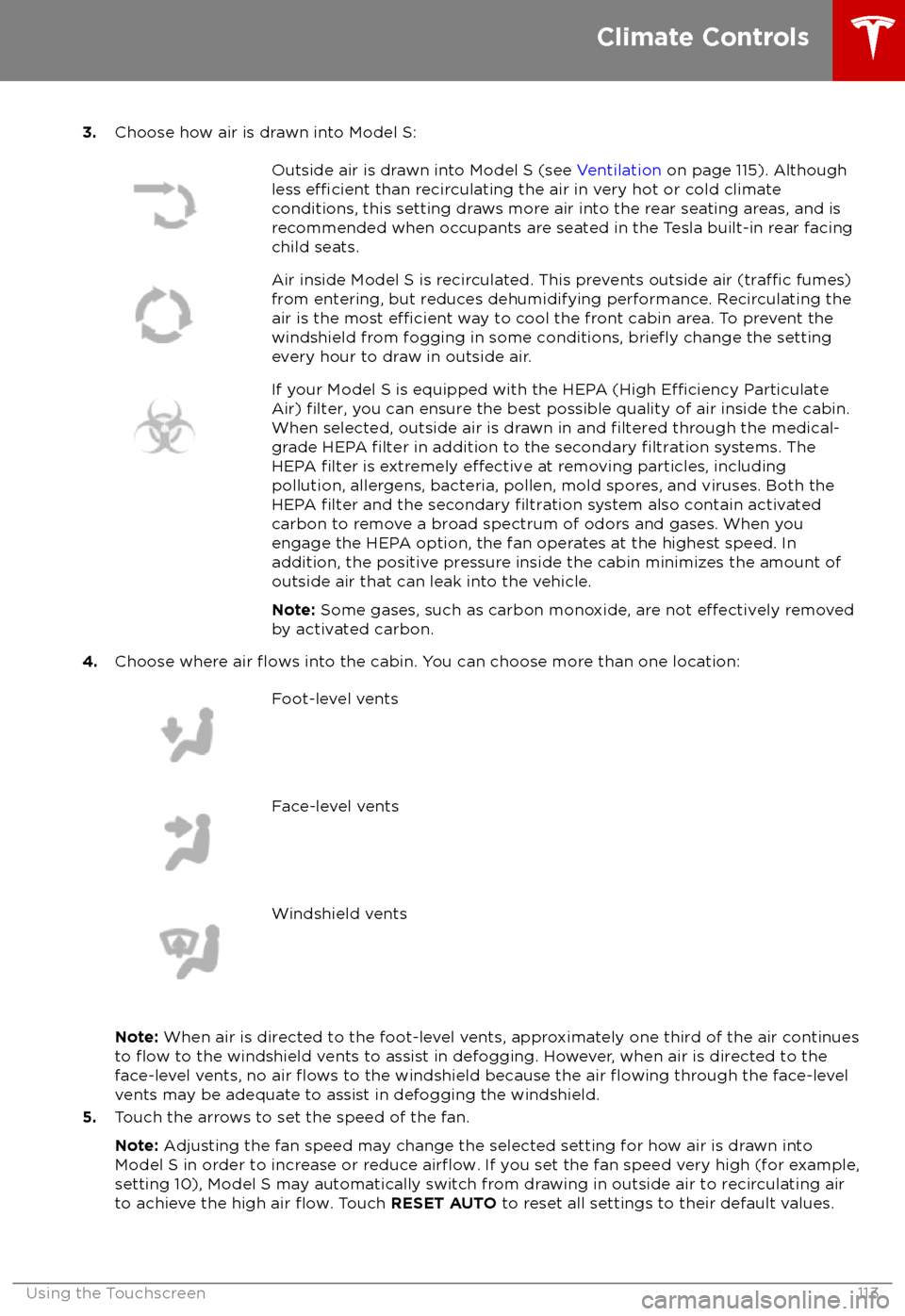
3.Choose how air is drawn into Model S:Outside air is drawn into Model S (see Ventilation on page 115). Although
less efficient than recirculating the air in very hot or cold climate
conditions, this setting draws more air into the rear seating areas, and is
recommended when occupants are seated in the Tesla built-in rear facing
child seats.Air inside Model S is recirculated. This prevents outside air (traffic fumes)
from entering, but reduces dehumidifying performance. Recirculating the
air is the most
efficient way to cool the front cabin area. To prevent the
windshield from fogging in some conditions, briefly change the setting
every hour to draw in outside air.
If your Model S is equipped with the HEPA (High Efficiency Particulate
Air) filter, you can ensure the best possible quality of air inside the cabin.
When selected, outside air is drawn in and filtered through the medical-
grade HEPA filter in addition to the secondary filtration systems. The
HEPA filter is extremely effective at removing particles, including
pollution, allergens, bacteria, pollen, mold spores, and viruses. Both the
HEPA
filter and the secondary filtration system also contain activated
carbon to remove a broad spectrum of odors and gases. When you
engage the HEPA option, the fan operates at the highest speed. In
addition, the positive pressure inside the cabin minimizes the amount of
outside air that can leak into the vehicle.
Note: Some gases, such as carbon monoxide, are not
effectively removed
by activated carbon.
4. Choose where air flows into the cabin. You can choose more than one location:
Foot-level ventsFace-level ventsWindshield vents
Note: When air is directed to the foot-level vents, approximately one third of the air continues
to flow to the windshield vents to assist in defogging. However, when air is directed to the
face-level vents, no air flows to the windshield because the air flowing through the face-level
vents may be adequate to assist in defogging the windshield.
5. Touch the arrows to set the speed of the fan.
Note: Adjusting the fan speed may change the selected setting for how air is drawn into
Model S in order to increase or reduce
airflow. If you set the fan speed very high (for example,
setting 10), Model S may automatically switch from drawing in outside air to recirculating air to achieve the high air
flow. Touch RESET AUTO to reset all settings to their default values.
Climate Controls
Using the Touchscreen113
Page 156 of 195

Cleaning the Interior
Frequently inspect and clean the interior to maintain its appearance and to prevent
premature wear. If possible, immediately wipe up spills and remove marks. For general
cleaning, wipe interior surfaces using a soft
cloth (such as
microfiber) dampened with a
mixture of warm water and mild non-
detergent cleaner (test all cleaners on a
concealed area before use). To avoid streaks,
dry immediately with a soft lint-free cloth.
Interior Glass
Do not scrape, or use any abrasive cleaning
fluid on glass or mirrored surfaces. This can
damage the reflective surface of the mirror
and the heating elements in the rear window.
Airbags
Do not allow any substance to enter an airbag
cover. This could
affect correct operation.
Dashboard and Plastic Surfaces
Do not polish the upper surfaces of the
dashboard. Polished surfaces are
reflectiveand could interfere with your driving view.
Leather Seats
Leather is prone to dye-transfer which can
cause discoloration, particularly on light colored leather. White and tan leather iscoated with an anti-soiling treatment. Wipespills as soon as possible using a soft cloth
moistened with warm water and non-
detergent soap. Wipe gently in a circular
motion. Then wipe dry using a soft, lint-free
cloth. Using detergents or commercially
available leather cleaners and conditioners is
not recommended because they can discolor or dry out the leather.
Polyurethane Seats
Wipe spills as soon as possible using a soft
cloth moistened with warm water and non-
detergent soap. Wipe gently in a circular
motion. After cleaning, allow the seats to air
dry.
Cloth Seats
Wipe spills as soon as possible using a soft
cloth moistened with warm water and non-
detergent soap. Wipe gently in a circular
motion. Then wipe dry using a soft, lint-free
cloth. Vacuum the seats as needed to remove
any loose dirt.
Carpets
Avoid over-wetting carpets. For heavily soiled
areas, use a diluted upholstery cleaner.
Seat Belts
Extend the belts to wipe. Do not use any type
of detergent or chemical cleaning agent.
Allow the belts to dry naturally while
extended, preferably away from direct
sunlight.
Tesla Built-In Rear Facing Child Seats
Vacuum the seats to remove any loose dirt. Wipe the seats with a soft cloth dampened
with warm water. You can also use an upholstery cleaner designed for automotive
use. Extend the belts to wipe. Allow the belts
to dry naturally, preferably away from direct
sunlight.
Touchscreen and Instrument Panel
Clean the touchscreen and instrument panel
using a soft lint-free cloth
specificallydesigned to clean monitors and displays. Do not use cleaners (such as a glass cleaner) and
do not use a wet wipe or a dry statically- charged cloth (such as a recently washed
microfiber). To wipe the touchscreen without
activating buttons and changing settings, you
can enable clean mode. Touch Controls >
Displays > Clean Mode . The display darkens to
make it easy to see dust and smudges.
Chrome and Metal Surfaces
Polish, abrasive cleaners or hard cloths can
damage the
finish on chrome and metal
surfaces.
Cautions for Interior Cleaning
Caution: Using solvents (including
alcohol), bleach, citrus, naphtha, or silicone-based products or additives on
interior components can cause damage.Caution: Statically-charged materials can
cause damage to the touchscreen or
instrument panel.Warning: If you notice any damage on an
airbag or seat belt, contact Tesla
immediately.Warning: Do not allow any water,
cleaners, or fabric to enter a seat belt
mechanism.Warning: Exposure to chemical cleaners
can be hazardous and can irritate eyes
Cleaning
Maintenance155
Page 169 of 195

Cargo VolumeTotal cargo volume (rear seats not
folded)28.4 cu ft804.2 LRear cargo volume26.3 cu ft744.7 LRear cargo volume (with seats
folded down)58.1 cu ft1,645.2 LFront cargo volume2.1 cu ft59.5 L
Weights
Curb Weight* - 60/70/754,469 lbs2,027 kgCurb Weight* - 60D/70D/75D4,647 lbs2,108 kgCurb Weight* - 90D4,736 lbs2,148 kgCurb Weight* - P90D4,841 lbs2,196 kgCurb Weight* - 100D4,883 lbs2,215 kgCurb Weight* - P100D4,941 lbs2,241 kgGVWR** - 60/70/755,710 lbs2,590 kgGVWR** - 60D/70D/75D5,732 lbs2,600 kgGVWR** - 90D5,820 lbs2,640 kgGVWR** - P90D5,886 lbs2,670 kgGVWR** - 100D5,939 lbs2,694 kgGVWR** - P100D5,997 lbs2,720 kgGross Axle Weight Rating - Front2,866 lbs1,300 kgGross Axle Weight Rating- Rear3,196 lbs1,450 kgTrailer TowingNot permissible*Curb Weight = weight of the vehicle with correct fluid levels, no occupants and no cargo
**GVWR = Gross Vehicle Weight Rating
Dimensions and Weights
168Model S Owner